Software
August 2026
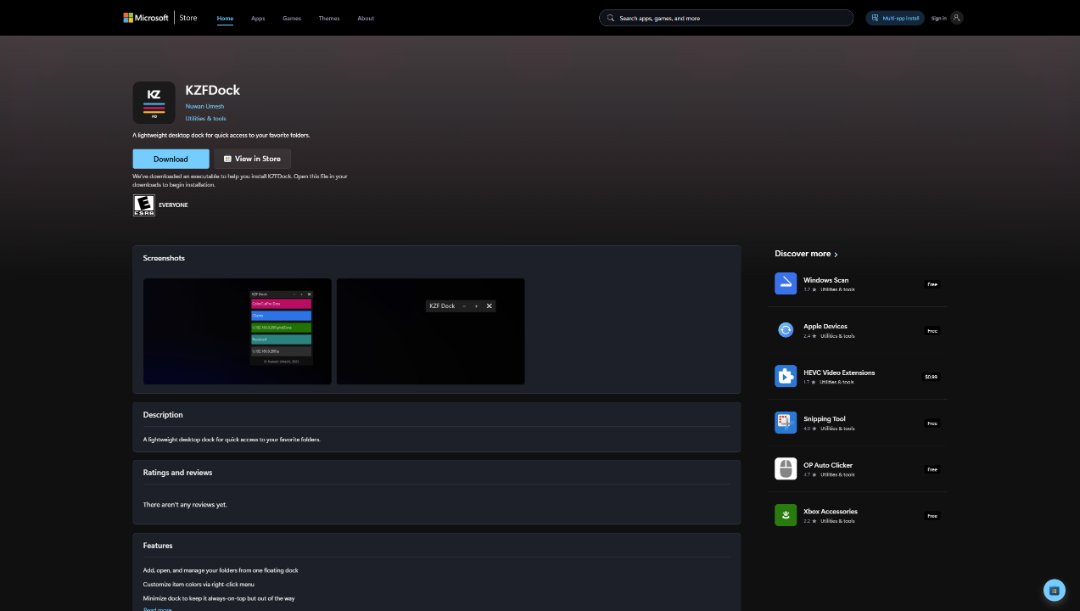
KZF Dock v2.0 is Officially available on Microsoft Store
I am thrilled to announce that KZF Dock v2.0 has officially landed on the Microsoft Store! Over the past few weeks, I have been pouring my energy into making your favorite lightweight desktop dock for quick access to folders smoother, more personal, and a lot easier to use.
Whether you want to customize your workspace, manage your apps in your native language, or enjoy a safer configuration system, version 2.0 has something special for you. Let me take you through what is new!
KZF Dock is now truly global. I have added full localization so you can use the software in your preferred language. Version 2.0 supports English as the default, alongside Arabic, Chinese, French, German, Hindi, Italian, Japanese, Romanian, Russian, Sinhala, and Tamil.
Organizing your dock is now easier than ever. Instead of deleting and re-adding shortcuts, you can now reorder dock items dynamically. Just right-click on any item and use the new Move Up and Move Down options to put your apps exactly where you want them.
Want your dock to match your style? With my new custom icon picker, you can easily choose your own PNG images or pick from my built-in default icons. Even better, I introduced real-time HSV, meaning Hue, Saturation, and Lightness adjustments. You can tweak the colors of your icons with a live background preview and 48x48 PNG exports before saving.
I have cleaned up the user interface to make navigation simple and clean. You can quickly access the settings panel using the footer menu and the new gear icon, change your active UI language on the fly, easily check your current software version 2.0.0.0, and view developer information—including a direct link to my official developer website—in the redesigned about dialog.
For better user experience and security, all confirmation popups such as Quit and Remove item are now beautifully centered on your screen with centered action buttons for better visual consistency. Furthermore, I implemented an enhanced atomic JSON configuration writer with rolling backups to protect your settings and prevent config file corruption, even if the app closes unexpectedly.
Update Today! You can grab the latest version right now on the Microsoft Store. I hope these new features make your daily computer experience much more enjoyable. Thank you for your continued support, and stay tuned for more updates.
https://apps.microsoft.com/detail/9NHBS5DTCMZB?hl=en-us&gl=US&ocid=pdpshare
KZF Dock is now truly global. I have added full localization so you can use the software in your preferred language. Version 2.0 supports English as the default, alongside Arabic, Chinese, French, German, Hindi, Italian, Japanese, Romanian, Russian, Sinhala, and Tamil.
Organizing your dock is now easier than ever. Instead of deleting and re-adding shortcuts, you can now reorder dock items dynamically. Just right-click on any item and use the new Move Up and Move Down options to put your apps exactly where you want them.
Want your dock to match your style? With my new custom icon picker, you can easily choose your own PNG images or pick from my built-in default icons. Even better, I introduced real-time HSV, meaning Hue, Saturation, and Lightness adjustments. You can tweak the colors of your icons with a live background preview and 48x48 PNG exports before saving.
I have cleaned up the user interface to make navigation simple and clean. You can quickly access the settings panel using the footer menu and the new gear icon, change your active UI language on the fly, easily check your current software version 2.0.0.0, and view developer information—including a direct link to my official developer website—in the redesigned about dialog.
For better user experience and security, all confirmation popups such as Quit and Remove item are now beautifully centered on your screen with centered action buttons for better visual consistency. Furthermore, I implemented an enhanced atomic JSON configuration writer with rolling backups to protect your settings and prevent config file corruption, even if the app closes unexpectedly.
Update Today! You can grab the latest version right now on the Microsoft Store. I hope these new features make your daily computer experience much more enjoyable. Thank you for your continued support, and stay tuned for more updates.
https://apps.microsoft.com/detail/9NHBS5DTCMZB?hl=en-us&gl=US&ocid=pdpshare
 Nuwan Umesh